
Teacher Simulator cover art

3D

Teacher Simulator

Step into a 3D classroom as a teacher, presenting lessons, grading answers, and managing students.

EasyBrowser · no download3D classroom exploration and interactionQuestion-and-answer teaching mechanics

Game overview

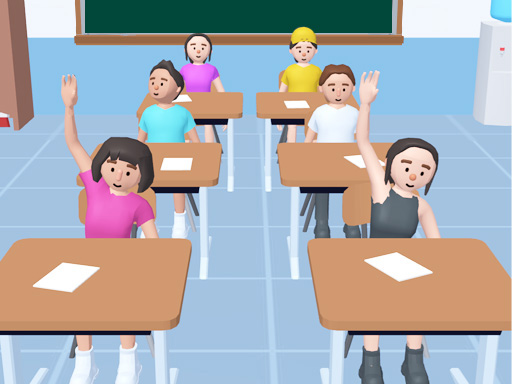
Teacher Simulator places you in a 3D school environment where you take on the role of a classroom instructor managing students and lessons. The three-dimensional classroom setting features rows of desks, a whiteboard, and animated student characters who react to your teaching. Present questions from the front of the room, evaluate student answers, and maintain order in this lighthearted simulation. The 3D perspective lets you walk between desks, approach individual students, and interact with classroom objects in a spatially engaging school setting.

Best suited to young players and casual gamers who enjoy school-themed simulation with a fun twist.

How to play Teacher Simulator

  1. Enter the 3D classroom and take your position at the front
  2. Present questions and puzzles to the class of students
  3. Evaluate student answers and assign scores accordingly
  4. Manage classroom behavior and progress through the school day

Controls

Mouse Click / Tap
Select questions and interact with students
WASD
Move around the 3D classroom
UI Buttons
Present lessons and grade answers

Objectives and failure conditions

Objectives

  • Successfully teach lessons and get correct answers from students
  • Score student responses accurately
  • Progress through the school day without major disruptions

The run ends when

  • No strict fail states — the game is designed as a lighthearted simulation

Gameplay mechanics

  • 3D classroom exploration and interaction
  • Question-and-answer teaching mechanics
  • Student grading and scoring system
  • Classroom management with behavioral elements

Device compatibility

Desktop

Supported

Playable in current desktop web browsers.
Mobile

Supported

Playable on current mobile browsers with touch controls.

Tablet

Supported

Playable on current tablet browsers with touch controls.

Tips for Teacher Simulator

  • Pay attention to each student character's reaction to gauge correct answers
  • Walk around the classroom to engage with students at their desks
  • Balance difficulty of questions to keep all students engaged

What worked and what did not

Pros

  • Charming 3D school environment with relatable classroom dynamics
  • Educational twist makes it entertaining and mentally engaging
  • Simple mechanics accessible to players of all ages

Cons

  • Limited depth compared to more complex simulation games
  • Repetitive question formats may lose novelty over time

Player comments

No published comments yet. Be the first.